- Who files
- The registrant of a highway vehicle of 55,000 lb or more
- Tax period
- July 1, 2026 to June 30, 2027
- Due
- Last day of the month after the month of first use
- E-file
- Required for 25 or more taxable vehicles
- Proof of payment
- Stamped or watermarked Schedule 1
At a glance
Form 2290, Heavy Highway Vehicle Use Tax Return, reports and pays the federal heavy vehicle use tax on trucks and tractors with a taxable gross weight of 55,000 pounds or more, and reports suspended vehicles. The current revision is July 2026, for the period July 1, 2026, through June 30, 2027. This page follows the form and the Instructions for Form 2290 (Rev. July 2026). It is general information, not tax advice.
- Who files. The person in whose name the vehicle is registered, or required to be registered, when it is first used on public highways in the period. That includes an owner-operator whose truck is registered in their name; see what Form 2290 is.
- When. “Form 2290 must be filed by the last day of the month following the month of first use”. “The filing deadline isn’t tied to the vehicle registration date.” The due dates guide has the full table.
- How. “Electronic filing is required for each return reporting and paying tax on 25 or more vehicles”; below that you may file on paper or e-file through an IRS-authorized e-file provider. See how to file.
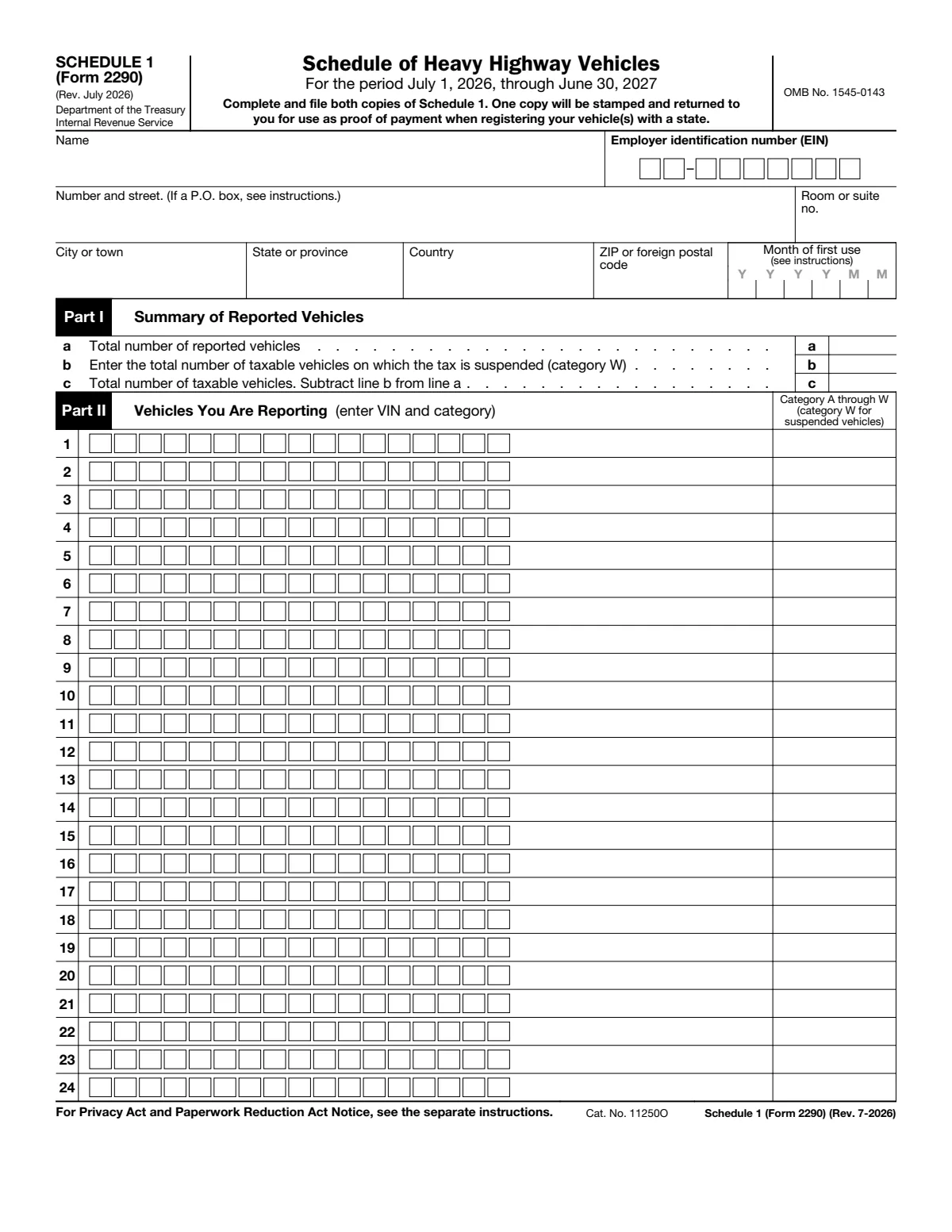
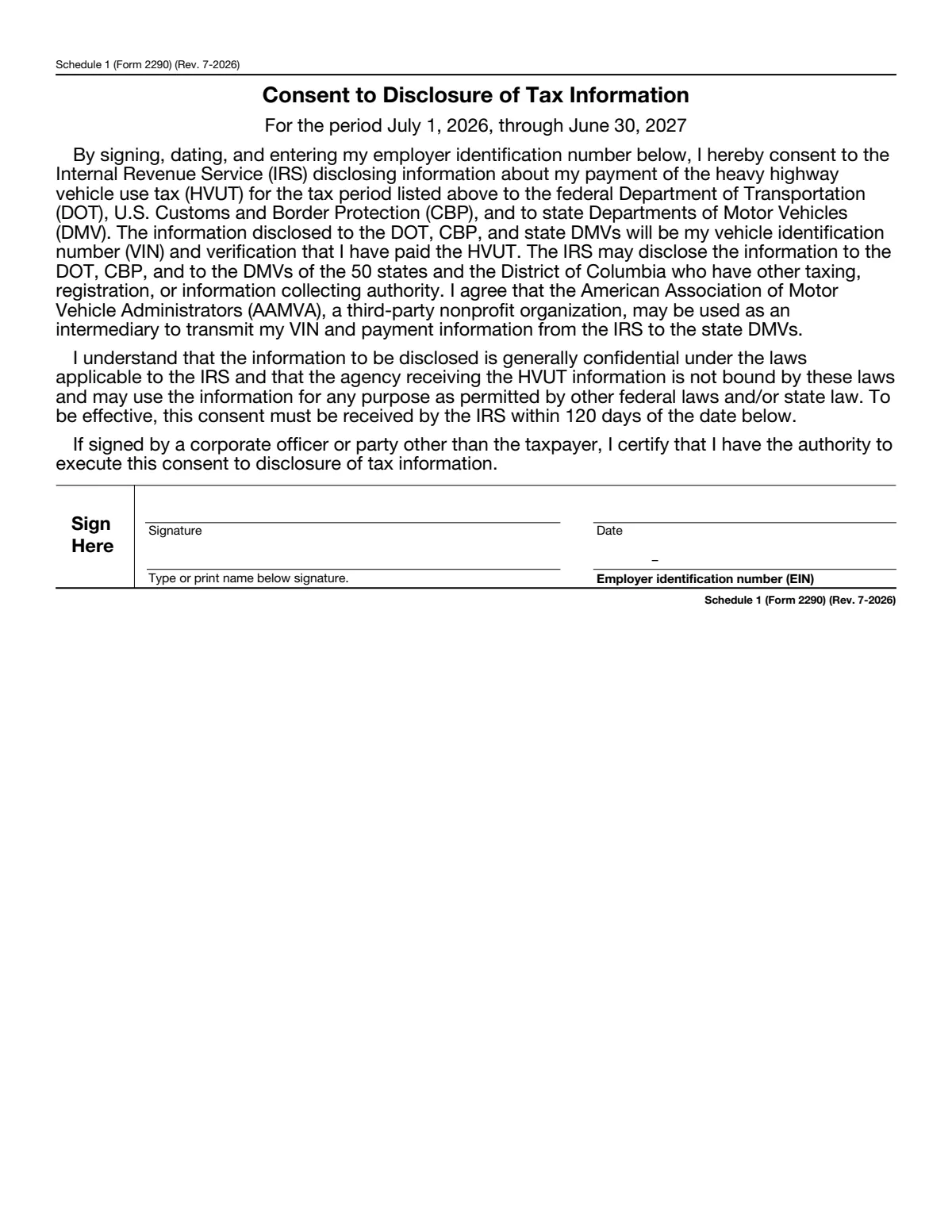
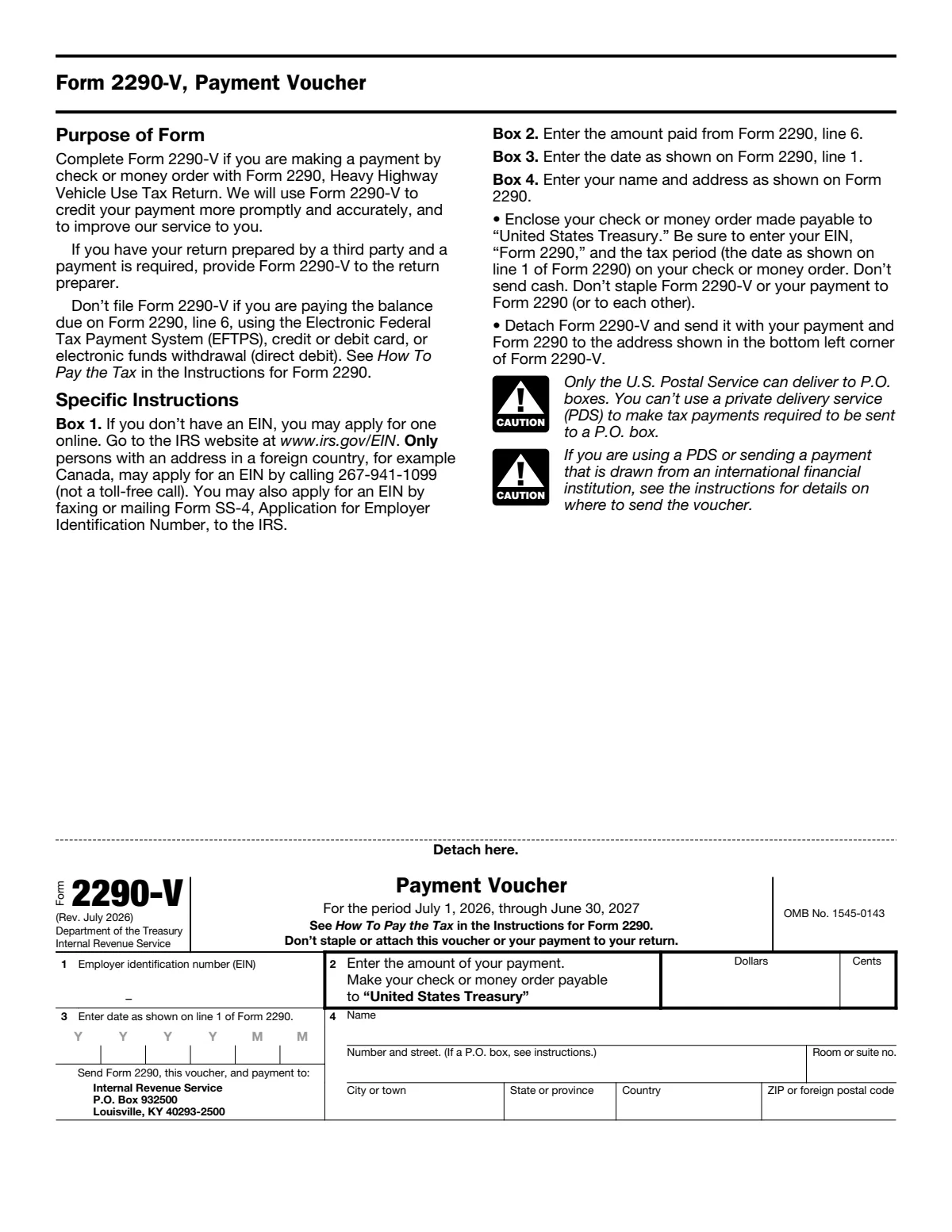
- What you file. Two form pages, both copies of Schedule 1 and, when you pay by check, Form 2290-V. The consent page is optional. The PDF also holds a cover sheet and blank pages, which this page leaves out.
Tap a box once for its note, again to jump to the line. Zoom in to read the small print.
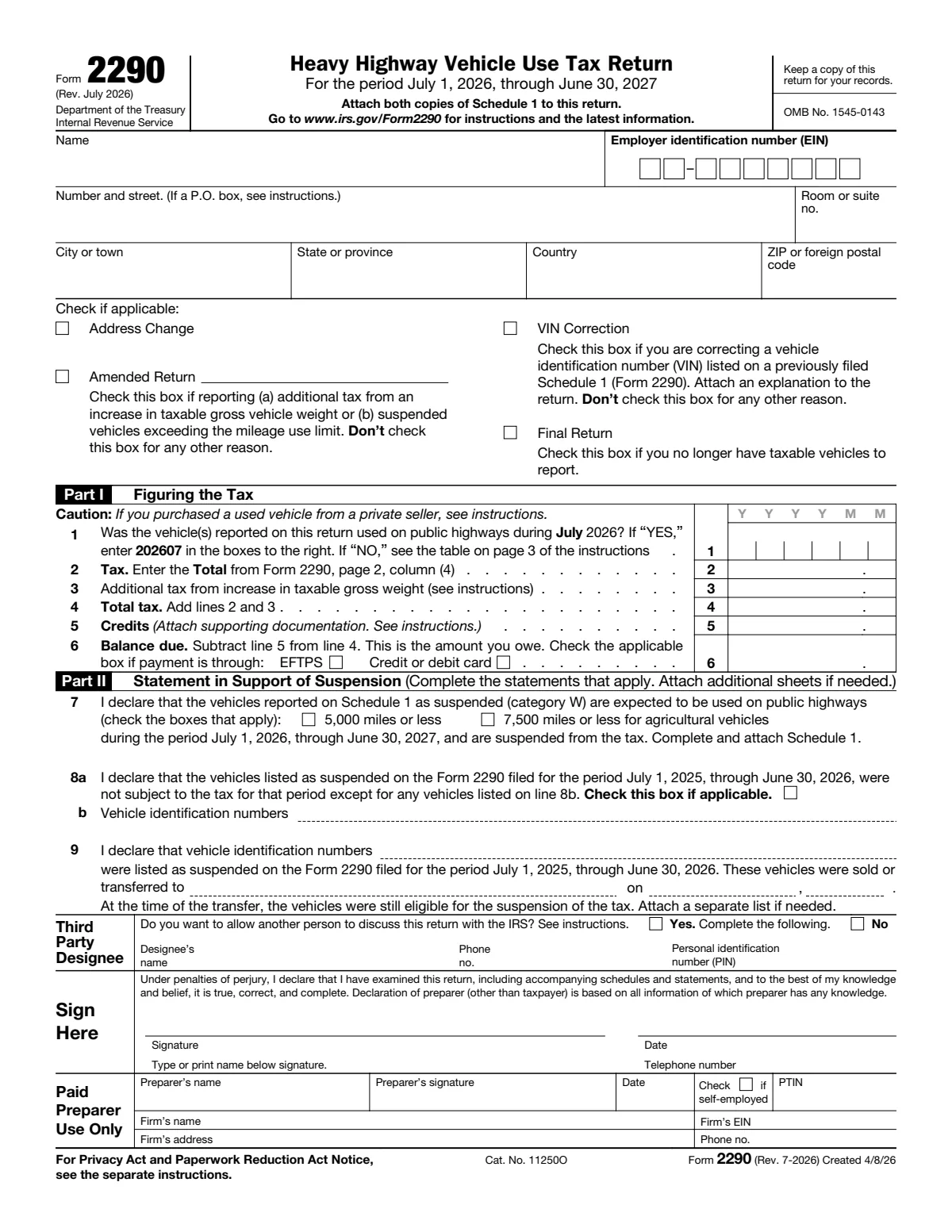
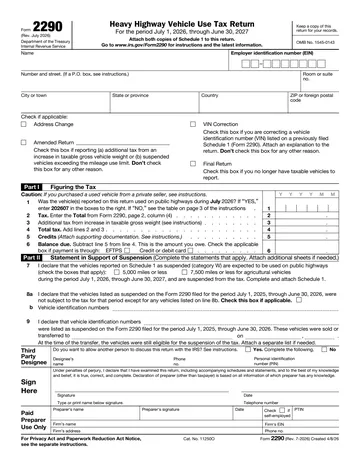
Top of page 1
The name, EIN and address must match Schedule 1 and the IRS's records. The four check boxes are for special returns only; a normal return checks none of them.
| Line | Label | What goes there |
|---|---|---|
| Name | Name | “Use the same name on your Form 2290 as was assigned to you with your EIN.” The IRS FAQs for e-filers explain why: “On an e-filed return, if a taxpayer's unique ID doesn't match our records, it's rejected.” See the EIN and name control rule. |
| EIN | Employer identification number (EIN) | “You must have an EIN to file Form 2290. You can’t use your social security number (SSN).” Apply at IRS.gov/EIN if you have none; a person with an address in a foreign country (Canada, for example) may also apply by phone. |
| Address | Number and street, city, state or province, country, ZIP | Include the suite or room number. Use a P.O. box only if the post office does not deliver to the street address. For a Canadian or Mexican address, follow that country's postal code practice and do not abbreviate the country name. |
| Address-change | Address Change | “If your address has changed, check the Address Change box on Form 2290.” |
| Amended | Amended Return | Check it only for (a) additional tax because a vehicle's taxable gross weight increased into a new category (line 3) or (b) a suspended vehicle that went over the mileage use limit. “Don’t check the box for any other reason.” Write the month of the increase, or the month the limit was exceeded, on the line to the right of the box. See amended returns. |
| VIN-correction | VIN Correction | For a wrong VIN on a Schedule 1 you already filed: list the corrected VIN on Schedule 1, use the Form 2290 for the tax period you are correcting, and “Attach a statement with an explanation for the VIN correction.” Do not check it for any other reason. |
| Final | Final Return | “If you no longer have vehicles to report, file a final return.” Check the box, sign the return and mail it to the IRS. |
Part I: figuring the tax
Complete page 2 first: line 2 comes from its Totals line. The Form 2290 calculator gives the tax for a category and month of first use.
| Line | Label | What goes there |
|---|---|---|
| 1 | Month of first use (YYYYMM) | “Enter the date for the month of first use during the tax period.” For vehicles used in July 2026, enter 202607. A truck first used in November 2026 is 202611 and goes on its own return: “If you first use multiple vehicles in more than 1 month, then a separate Form 2290 must be filed for each month”. A used truck bought from a private seller who paid the tax: enter the month after the sale (see buying or selling a truck). |
| 2 | Tax | The Total from page 2, column (4). “Don’t use line 2 to report additional tax from an increase in taxable gross weight.” The one exception: a suspended vehicle that went over the mileage limit is taxed here, on an amended return. |
| 3 | Additional tax from increase in taxable gross weight | “Complete line 3 only if the taxable gross weight of a vehicle increases during the period and the vehicle falls in a new category.” The worksheet in the instructions takes the new category's partial-period tax for the month of the increase minus the old category's tax for that month. Attach the worksheet for each vehicle, check Amended Return, and file by the last day of the month after the month of the increase. |
| 4 | Total tax | Line 2 plus line 3. |
| 5 | Credits | A credit for tax already paid on a vehicle that was sold, destroyed or stolen before June 1 and not used again in the period, or that was used 5,000 miles or less (7,500 for agricultural vehicles) in the prior period. “The amount claimed on line 5 can’t exceed the tax reported on line 4.” Attach a sheet with the VIN, category, date of the sale, theft or destruction, the credit worksheet and, for a sale, the buyer's name and address. Anything above line 4 is claimed on Form 8849 Schedule 6. “A credit, lower tax, exemption, or refund isn’t allowed for an occasional light or decreased load or a discontinued or changed use of the vehicle.” |
| 6 | Balance due | Line 4 minus line 5. “You must pay the tax in full with your Form 2290.” Four ways to pay: direct debit when you e-file, EFTPS, credit or debit card, or check or money order with Form 2290-V. Check the EFTPS or card box if you use one. “For EFTPS payments to be on time, you must submit the payment by 8:00 p.m. Eastern time the day before the date the payment is due.” |
Part II: suspension statement, and the signature block
Part II is for vehicles you expect to drive 5,000 miles or less on public highways in the period (7,500 for agricultural vehicles), and for last period's suspended vehicles. Suspended vehicles still go on the return and on Schedule 1, as category W.
| Line | Label | What goes there |
|---|---|---|
| 7 | Suspended vehicles (category W) | “Complete line 7 to suspend the tax on vehicles expected to be used less than the mileage use limit during a period.” Check the 5,000 miles box, the 7,500 miles box for agricultural vehicles, or both. List each suspended vehicle on Schedule 1 as category W and count them on Schedule 1, line b. See suspended vehicles. |
| 8a | Last period's suspended vehicles | Check the box to verify that vehicles listed as suspended on the 2025 to 2026 Form 2290 stayed within the mileage use limit, except the vehicles you list on line 8b. |
| 8b | Vehicle identification numbers | The VINs of last period's suspended vehicles that went over the limit. You report and pay their tax on a separate Form 2290 for that prior period. “Once a suspended vehicle exceeds the mileage use limit, the tax becomes due.” |
| 9 | Suspended vehicles sold or transferred | If last period's line 7 listed vehicles you then sold or transferred, give their VINs, the buyer or transferee and the date. When you sell a suspended vehicle you must give the buyer a statement with your name, address and EIN, the VIN, the date of sale, the odometer readings at the start of the period and at the sale, and the buyer's name, address and EIN. “The mileage use limit applies to the total mileage a vehicle is used during a period, regardless of the number of owners.” |
| Designee | Third Party Designee | Check Yes to let an employee, a return preparer or another person discuss this return with the IRS; enter the designee's name, phone number and a five-digit PIN the designee picks. It does not let them bind you or represent you. “The authorization will automatically expire 1 year from the due date (without regard to extensions) for filing your Form 2290.” |
| Sign | Sign Here | Sign, date, print your name and add a phone number. “An unsigned return isn’t considered filed.” |
| Preparer | Paid Preparer Use Only | A preparer who was paid and is not an employee of the filer signs here and gives the preparer's own PTIN (not the firm's), the firm's name, EIN and address, and gives you a copy of the return. |
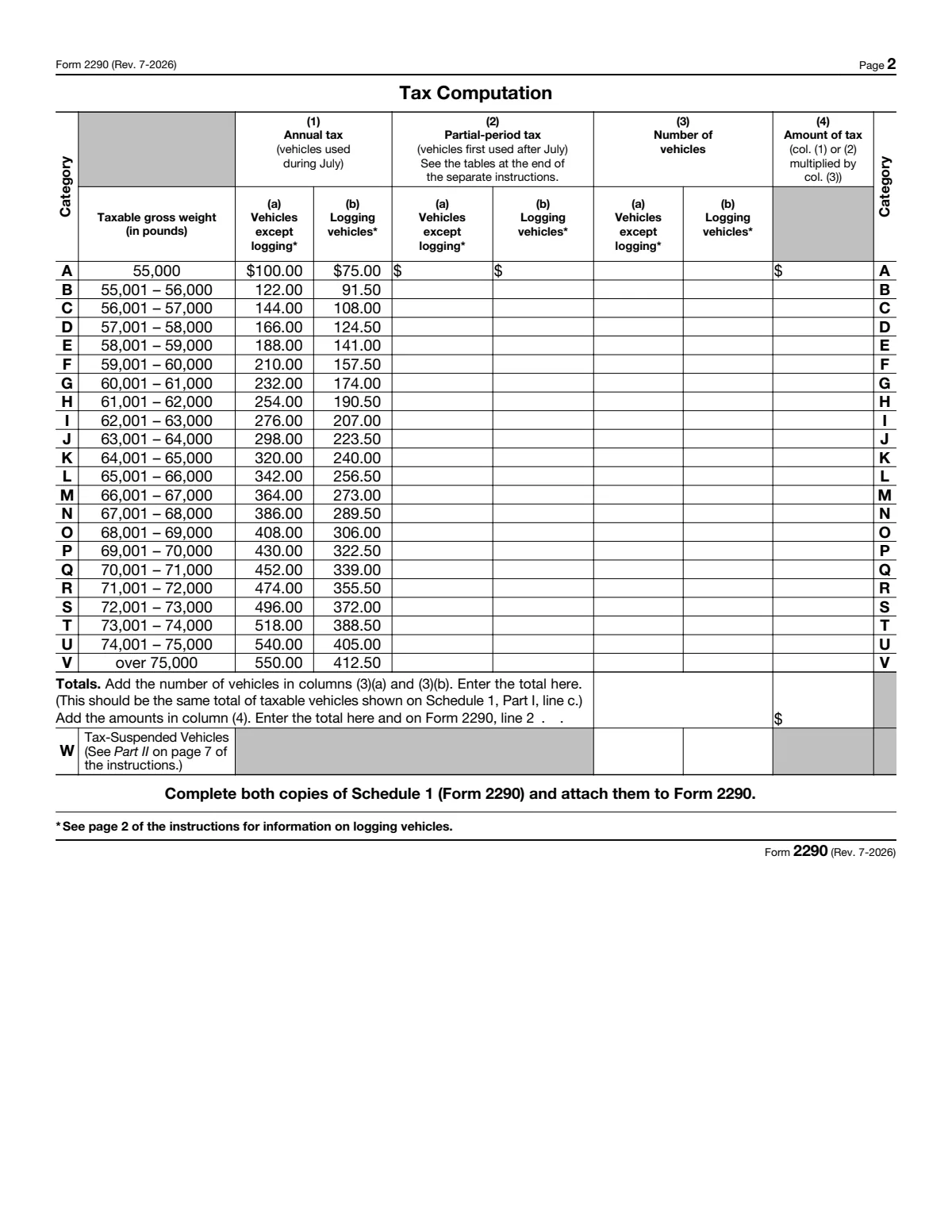
Page 2: tax computation
One row per weight category, A to V, plus W for suspended vehicles. Column (1) holds the printed annual tax for vehicles first used in July; column (2) is where you write the partial-period tax for later months.
| Column | Label | What goes there |
|---|---|---|
| A-V | Category and taxable gross weight | Each category is a 1,000-pound band: A is 55,000 lb, B is 55,001 to 56,000 lb, and so on to V, over 75,000 lb. Taxable gross weight is the unloaded weight of the truck and the trailers it customarily pulls, fully equipped, plus the heaviest load it customarily carries. If a state registers the vehicle by a declared gross weight, it can be no less than the highest weight declared in any state. See taxable gross weight. |
| (1) | Annual tax (vehicles used during July) | “Use the tax amounts listed in column (1)(a) for a vehicle used during July.” The printed amounts run from $100.00 (category A) to $550.00 (category V) in column (1)(a), and $75.00 to $412.50 for logging vehicles in column (1)(b). See the tax table. |
| (2)(a) | Partial-period tax, vehicles except logging | For vehicles first used after July, “the tax is based on the number of months remaining in the period.” Take the amount from Table I at the end of the instructions for the month of first use and the category. Category V first used in November 2026 is $366.67 (8 months). |
| (2)(b) | Partial-period tax, logging vehicles | Logging vehicles first used after July use Table II. A vehicle is a logging vehicle only if it hauls harvested forest products exclusively and is registered that way; see logging and agricultural vehicles. |
| (3)(a) | Number of vehicles except logging | The number of vehicles in each category, then the combined total of columns (3)(a) and (3)(b) on the Totals line. “For category W, enter the number of suspended vehicles in the applicable column.” |
| (3)(b) | Number of logging vehicles | The number of logging vehicles in each category. |
| (4) | Amount of tax | “Multiply the applicable tax amount times the number of vehicles.” Add all amounts in a category, then add column (4) for categories A to V. |
| Totals | Totals | The total number of taxable vehicles (the form says it should equal Schedule 1, Part I, line c) and the total tax, which you carry to page 1, line 2. |
| W | Category W, tax-suspended vehicles | The number of suspended vehicles. Column (4) is shaded: no tax is due on them unless they go over the limit. Suspended vehicles do not count toward the 25-vehicle e-file rule. |
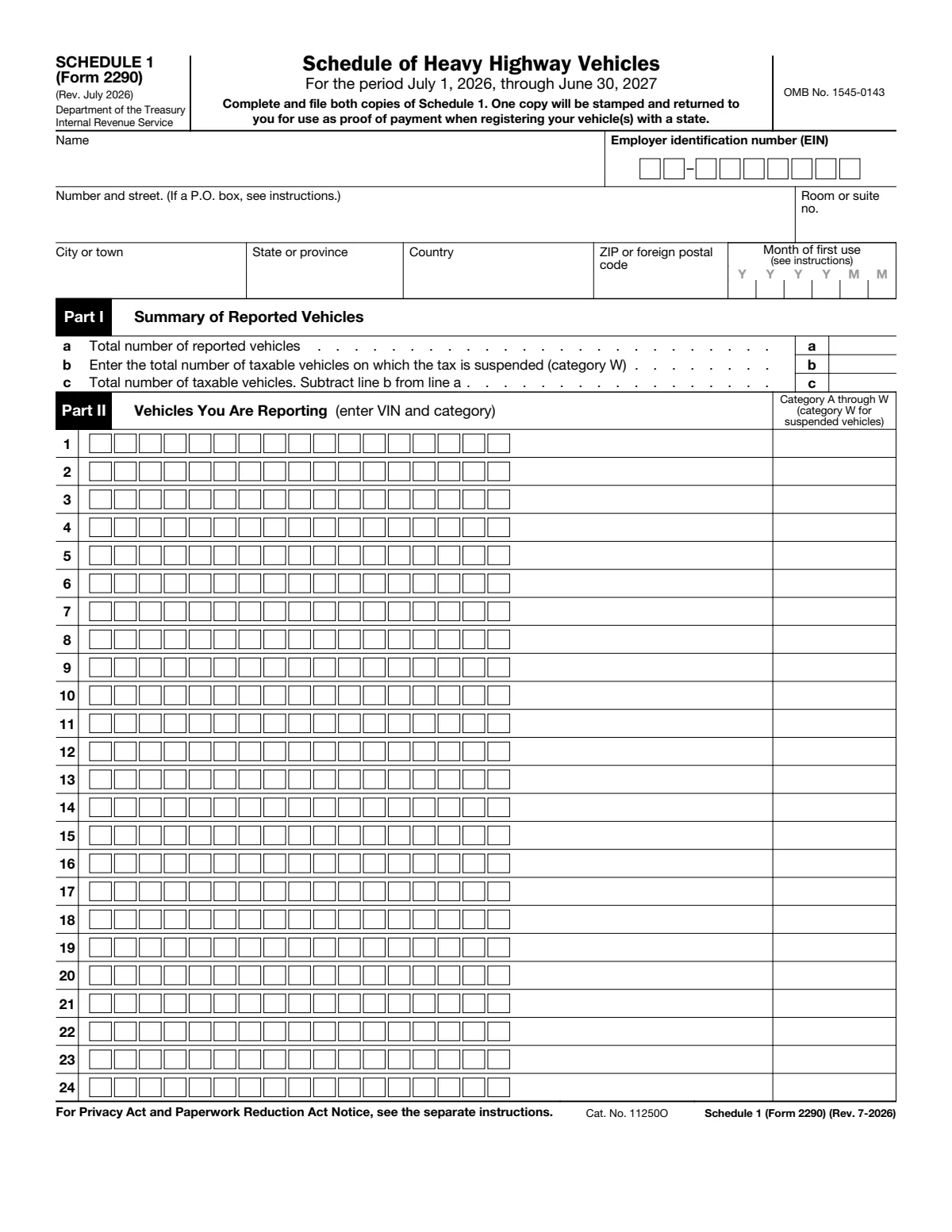
Schedule 1: schedule of heavy highway vehicles
Schedule 1 lists every vehicle by VIN and category. The stamped copy is the proof of payment states ask for when you register or renew, and that U.S. Customs and Border Protection asks for when a Canadian or Mexican vehicle enters the United States.
| Line | Label | What goes there |
|---|---|---|
| S1-name | Name, EIN and street address | “Enter your name and address on Schedule 1 exactly as shown on Form 2290.” The EIN must be the same as on page 1. |
| S1-city | City, state or province, country, ZIP | Exactly as on Form 2290. |
| S1-month | Month of first use | “Enter the same date as that entered on Form 2290, Part I, line 1, in the space for Month of first use.” |
| S1-a | a: Total number of reported vehicles | The total number of vehicles reported on Form 2290, page 2. |
| S1-b | b: Suspended vehicles (category W) | The category W count from page 2, column (3). |
| S1-c | c: Total number of taxable vehicles | Line a minus line b. |
| S1-VIN | Part II: VIN, rows 1 to 24 | The VIN of each vehicle you report, by category. Generally 17 numbers and letters, from the registration, title or vehicle. “Be sure to use the VIN for the vehicle and not from the trailer.” “Failure to include the full VIN may prevent you from registering your vehicle with the state.” |
| S1-category | Category A through W | The category letter for each VIN, from page 2, or W for a suspended vehicle. |
| S1-copy2 | Second copy of Schedule 1 | The PDF prints Schedule 1 twice. Complete both: “The second copy will be stamped and returned to you for use as proof of payment.” “Your return may be rejected if Schedule 1 isn’t attached to Form 2290.” When you e-file, the watermarked Schedule 1 comes back through your e-file provider. See Schedule 1 as proof of payment. |
Consent page and Form 2290-V
| Box | Label | What goes there |
|---|---|---|
| Consent | Consent to Disclosure of Tax Information | Signing, dating and entering your EIN lets the IRS share your VINs and the verification that you paid with the Department of Transportation, U.S. Customs and Border Protection and state DMVs. “The IRS needs your consent to release this information.” The form adds: “To be effective, this consent must be received by the IRS within 120 days of the date below.” |
| V1 | Form 2290-V, box 1: EIN | Your EIN. Use the voucher only when you pay by check or money order. |
| V2 | Box 2: amount of your payment | The amount from Form 2290, line 6. Make the check or money order payable to United States Treasury and write your name, address, EIN, “Form 2290” and the box 3 date on it. |
| V3 | Box 3: date from line 1 | The same date as Form 2290, Part I, line 1. With full payment, the paper return, both copies of Schedule 1, the voucher and the check go to Internal Revenue Service, P.O. Box 932500, Louisville, KY 40293-2500 (the address printed on the voucher). Do not staple the payment to the voucher or the return. |
| V4 | Box 4: name and address | “Enter your name and address exactly as shown on Form 2290.” Do not use the voucher if you pay by EFTPS, card or direct debit. |
Line 1 and the due date
The date on line 1 (and on Schedule 1 and the voucher) is the month of first use, not the filing month. The instructions pair each one with a due date; dates already moved for weekends and holidays are shown as the instructions print them. “If any due date falls on a Saturday, Sunday, or legal holiday, file by the next business day.”
| First used in | Line 1 entry | File and pay by |
|---|---|---|
| July 2026 | 202607 | August 31, 2026 |
| August 2026 | 202608 | September 30, 2026 |
| September 2026 | 202609 | November 2, 2026 |
| October 2026 | 202610 | November 30, 2026 |
| November 2026 | 202611 | December 31, 2026 |
| December 2026 | 202612 | February 1, 2027 |
| January 2027 | 202701 | March 1, 2027 |
| February 2027 | 202702 | March 31, 2027 |
| March 2027 | 202703 | April 30, 2027 |
| April 2027 | 202704 | June 1, 2027 |
| May 2027 | 202705 | June 30, 2027 |
| June 2027 | 202706 | August 2, 2027 |
How it connects
Each part of the form has a guide that explains the rule behind it:
- Who files and what is taxed: Form 2290: what it is and who must file.
- Category (page 2): taxable gross weight and the tax table.
- Line 1 and filing: due dates by first use month and how to file and the 25-vehicle rule.
- Line 7 and category W: suspended vehicles.
- Line 5 and refunds: credits and refunds and the Form 8849 Schedule 6 form page.
- Amended Return and VIN Correction: amended returns.
- Name and EIN: the EIN rule and name control.
- Schedule 1: proof of payment, which IRP registration asks for (IRP renewals).
- Late filing: penalties and the HVUT sunset.
Questions filers ask
Can I file Form 2290 with my Social Security number?
No. The instructions say you must have an EIN to file Form 2290 and cannot use your SSN. Get the EIN first; a brand-new EIN can take time to work for e-filing.
Do I list my trailer on Schedule 1?
No. Schedule 1 takes the VIN of the truck or tractor. The trailer's weight counts toward taxable gross weight, but its VIN does not go on the form.
I bought a second truck in November. Do I amend my July return?
No. A vehicle first used in a later month goes on its own Form 2290 with that month on line 1 (202611 for November 2026), due by the end of the next month, with the partial-period tax from Table I in column (2).
What do I file for a truck I expect to drive under 5,000 miles?
Report it as category W on page 2 and Schedule 1 and check the 5,000 miles box on line 7. No tax is due unless it goes over the limit; then file an amended return by the end of the month after the month it went over.
When do I get the stamped Schedule 1?
On a paper return the IRS stamps the second copy and mails it back. When you e-file, the provider sends you the Schedule 1 with the IRS watermark, which the instructions say can be available within minutes after the IRS accepts the return.